Viewing Single Trivia
▲
1
▼
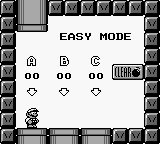
Pressing Select on the File Select screen will cause Mario to shrink and activate Easy Mode, indicated by those words appearing on-screen before selecting a file and just before a selected stage finishes loading. In Easy Mode, there are fewer enemies in levels, some mini-bosses such as Floating Faces take one hit to be defeated, and certain sections in Mario's Castle are less tricky to navigate.
Gameplay footage:
https://www.youtube.com/watch?v=WsQ2SSX3NVc#t=60
MarioWiki article:
https://www.mariowiki.com/Easy_Mode
https://www.youtube.com/watch?v=WsQ2SSX3NVc#t=60
MarioWiki article:
https://www.mariowiki.com/Easy_Mode
Attachment
Comments (0)
You must be logged in to post comments.
Related Games
Mario Pinball Land
Yoshi
Super Mario Run
Super Mario World
Super Mario All-Stars
Dr. Mario
Captain Toad: Treasure Tracker
Super Mario Sunshine
New Super Luigi U
Mario & Luigi: Superstar Saga
Super Mario Bros. 2
Super Mario Maker
Super Mario Bros. Wonder: Nintendo Switch 2 Edition + Meetup in Bellabel Park
Super Mario Land
Dance Dance Revolution Mario Mix
New Super Mario Bros. 2
Mario Party
New Super Mario Bros.
Super Mario 64: Shindou Pak Taiou Version
Super Mario Odyssey
Mario Is Missing!
Wario Land: Super Mario Land 3
Super Mario 3D Land
Super Mario Bros. Wonder
Super Mario Galaxy 2
Super Mario 3D World
Mario no Photopi
Mario Hoops 3-on-3
Mario 128
Paper Mario
New Super Mario Bros. U
Mario Golf
Mario Paint
Super Mario Bros. Deluxe
Mario Teaches Typing
Luigi's Mansion
Super Mario Kart
Mario & Sonic at the Olympic Games
Super Mario World 2: Yoshi's Island
Super Mario Galaxy 2
Super Mario Strikers
Mario Tennis
Super Princess Peach
BS Super Mario Collection
Super Mario 64 DS
Mario & Luigi: Bowser's Inside Story
Super Mario Bros.: The Lost Levels
Mario Superstar Baseball
Mario Artist: Paint Studio
Mario's Early Years! Fun with Letters